
Your laptop starts slowing down. Apps take longer to open. The fan runs louder than usual. Sometimes the internet works, sometimes it doesn't. So you start doing what everyone does. You search Google.
You try a few things:
-
Delete some files
-
Restart the PC
-
Open Task Manager and close random programs
-
Follow a YouTube tutorial telling you to type commands into CMD
-
Run Windows Update
-
Maybe even install a “PC cleaner”
The computer gets a little better. Then two weeks later… It’s slow again.
The Problem Nobody Explains
Windows problems are rarely one thing.
A slow PC usually comes from a mix of issues:
-
Corrupted Windows system files
-
Startup apps slowing boot
-
Driver problems after updates
-
Junk files filling the system
-
Network misconfigurations
-
Broken scheduled tasks
-
Hidden background processes
And fixing them properly requires running multiple system checks.
Commands like:
-
sfc /scannow -
DISM /RestoreHealth -
disk health checks
-
startup audits
-
driver scans
-
network diagnostics
These tools already exist inside Windows.
But they are scattered, hidden, and complicated.
Most people never run them all.
What I Built Instead
I built the tool I wish existed for anyone who owns a Windows PC.
It's called Firxttech Toolkit.
Instead of hunting for fixes online, you simply:
-
Double-click a single file
-
Click Yes on the admin prompt
-
Choose what you want to fix
-
Automate and schedule to run as often as you wish
That's it. No installation. No internet required. No complicated commands.
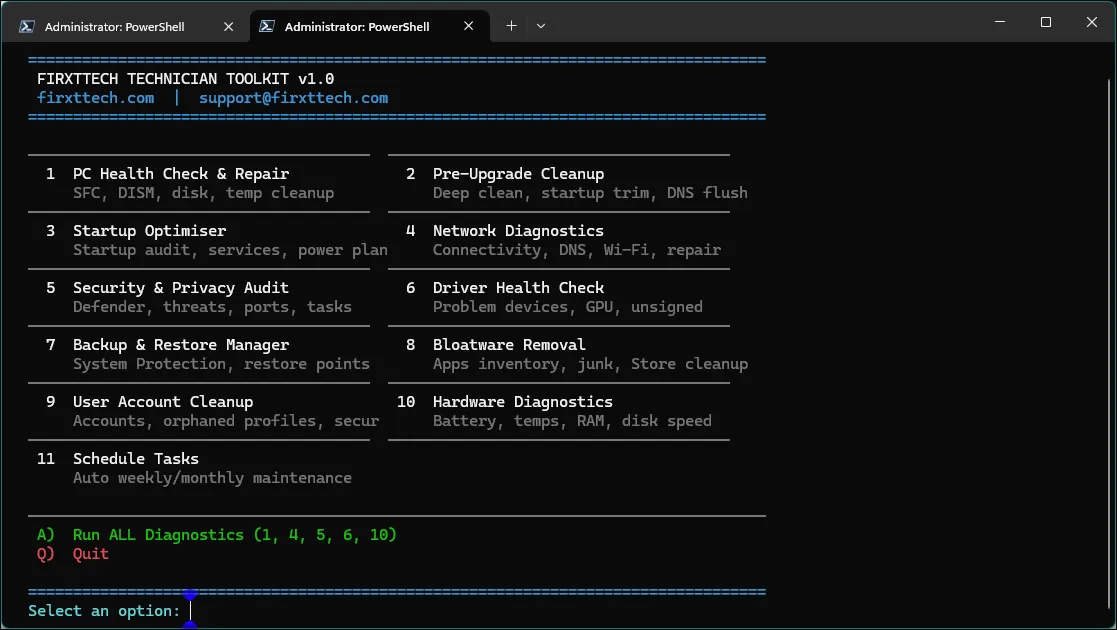
What It Actually Fixes
The toolkit runs the same system checks that professionals use to repair Windows PCs.
Tool | What It Does |
|---|---|
PC Health Check & Repair | Repairs Windows files, checks disk health, clears temp junk |
Startup Optimiser | Removes startup bloat slowing boot |
Network Diagnostics | Fixes connectivity, DNS, Wi-Fi problems |
Security & Privacy Audit | Checks firewall, open ports, Defender status |
Driver Health Check | Finds broken or outdated drivers |
Backup & Restore Manager | Verifies restore points and backup status |
Bloatware Removal | Lists and removes junk apps |
User Account Cleanup | Finds unused or broken profiles |
Hardware Diagnostics | Battery, RAM, CPU temperature, disk speed |
Schedule Tasks | Automates monthly maintenance |
Every scan saves a clear report to your desktop so you know exactly what was checked.
Why This Matters
Most people think their only option when Windows becomes unstable is:
Reinstall Windows.
But in many cases the real issue is just hidden system corruption or maintenance problems.
Running proper diagnostics first can save:
-
hours of troubleshooting
-
unnecessary reinstalls
-
lost files
-
expensive repair shop visits
Who This Is For
-
Anyone whose Windows PC has become slow
-
Laptop owners dealing with mysterious glitches
-
People who want to avoid reinstalling Windows
-
Power users who like to maintain their own computers
The Goal
Instead of guessing what’s wrong with your computer…
Run the same diagnostics professionals use, all in one place.
Available now on Selar and Gumroad 🇳🇬 Nigerian technicians: on Selar 🌍 International: on Gumroad One-time purchase. Instant download. Works on Windows 10 and 11. 👉 [BUY LINK — replace with Selar or Gumroad URL] |